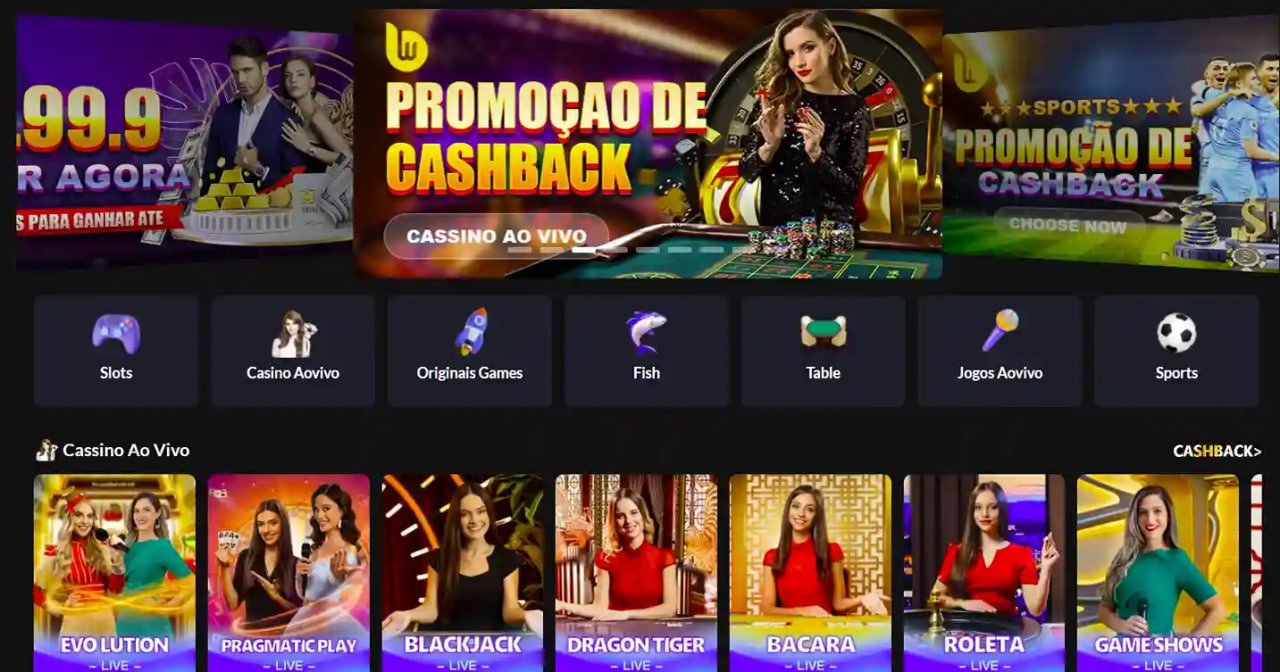
Play on mobile, anytime

Download the bbajje app — the full gaming experience on Android and iOS, right in your pocket.

Desktop-level performance, now on your phone. From Live Casino to Sports Betting — everything in one place with the bbajje app, whenever you need it.

Android supported iOS supported Web version
bbajje

Choose your device, bbajje is everywhere

Android, iOS, or your browser — all three give you the full bbajje experience.

Android App

v3.2.1 · APK Download

Samsung, Xiaomi, Oppo, Realme — install easily on any Android phone. The APK file is available directly from bbajje.

  • Android 6.0 or above
  • File size just 38 MB
  • RAM: 2 GB minimum
  • Push notifications supported
  • Auto-update feature
Download for Android

IOS App

v3.2.1 · App Store

The complete bbajje experience for iPhone and iPad users. Built to meet Apple's security standards.

  • iOS 13.0 or above
  • File size just 42 MB
  • iPhone 8 or above
  • Face ID / Touch ID supported
  • Full screen mode on iPad
Download for iOS

Web version

No installation required

Use bbajje directly from your browser without installing anything. Works on Chrome, Firefox, and Safari.

  • Any modern browser
  • No download needed
  • On both desktop and mobile
  • Responsive design
  • Full feature access
Play in browser
50+
Used locally
38 MB
Small app size
99.8%
Uptime guarantee
24/7
Live support

How to install the bbajje app on Android

The bbajje app is available as a direct APK file, so installation only takes a few minutes. First-time APK installs require enabling "Unknown Sources" in your phone's settings — this is a standard process and only needs to be done once.

Bbajje ensures its APK file is completely safe and built without any third-party software. After installation, the app automatically sends update notifications, so staying on the latest version is effortless.

Before downloading the bbajje APK file, make sure you are downloading directly from bbajje.xyz.
1
Open settings

Go to Settings > Security > Unknown Sources on your phone and enable it.

2
APK Download

Download the latest APK file from bbajje.xyz.

3
Install

Tap the downloaded file and press the install button.

4
Log in

Open the app and log in with your bbajje account.

bbajje
bbajje

Everything in the bbajje mobile app — a closer look

The bbajje mobile app is not just a scaled-down version of the desktop site. It was built specifically with mobile users in mind. Easy touch navigation, clear buttons on smaller screens, and fast loading — these three things are what bbajje prioritized above all.

Live Casino games on mobile might seem like a challenge, but bbajje handles it well. The live dealer video feed runs smoothly even on low bandwidth — most games play without issue even on a 3G network.

Fast loading

With optimized code and CDN servers, the bbajje app loads in under 3 seconds.

Push notifications

New bonuses, tournament kicks off, or withdrawal confirmed — every update goes straight to your phone.

Biometric login

Log in to your bbajje account securely and instantly using Face ID or your fingerprint.

Dark mode by default

Bbajje app's dark theme makes late-night or low-light gaming much easier on the eyes.

Works even on a weak network

Bbajje uses adaptive streaming technology to adjust quality based on your network conditions.

Browser vs. App — What makes the bbajje mobile app different

Many people assume opening a site in a mobile browser is enough — why bother installing a separate app? In practice, the difference is significant. The bbajje native app loads 40% faster than the browser version because it directly utilizes the device's processor and graphics.

When playing live games in a browser, switching tabs can pause the game or cut the video feed. The bbajje app doesn't have this problem — it keeps the connection alive even in the background. This is especially useful during live Sports Betting.

The app also features a quick deposit shortcut — right after logging in, one tap takes you straight to the deposit page, no navigating around like you would in a browser. These small conveniences are what make the bbajje mobile app so much more comfortable to use.

On average, users who install the bbajje app spend 3 times longer on the platform than browser users.

The biggest advantage is push notifications. Whether a favorite tournament is about to start or your deposit has been confirmed, the bbajje app notifies you instantly. This isn't always possible in a browser.

bbajje

Bbajje app on iPhone How to install

Getting bbajje on your Apple device is straightforward — just a few simple steps.

1
Open Safari

Open Safari on your iPhone and go to bbajje.xyz. Chrome works too.

2
Share button

Tap the Share icon (square with an arrow) in the bottom menu bar.

3
Add to Home Screen

Select the "Add to Home Screen" option and tap the "Add" button.

4
Open from home screen

The bbajje icon will appear on your home screen. Tap it to jump straight into the games.

About the download Frequently asked

Yes, the APK downloaded directly from bbajje.xyz is completely safe. The file is served from an SSL-encrypted server and scanned for malware before every update. Always make sure you're downloading from the official bbajje site only — files from third-party sites can be risky.

The "Unknown Sources" option allows app installations from sources other than the Play Store. Once you've installed the bbajje APK, you can turn this option back off — it won't affect apps you've already installed. On newer versions of Android, this setting can be managed separately for each app.

Yes. The bbajje app and website share the same account system. Your balance, bonuses, VIP points, and game history are all synced across platforms. A game you start on your phone can be picked up later on desktop.

When a new update is available for the Android app, the app itself sends you a notification. Tapping it takes you directly to the new APK download page. iOS users with auto-update enabled will receive updates automatically. The web version is always on the latest version — no action needed.

The Android APK is just 38 MB and the iOS version is 42 MB. On a standard mobile data connection, the download typically completes in 1–2 minutes. That said, downloading over Wi-Fi is recommended, especially if you're on a limited mobile data plan.

The bbajje app runs on Android 6.0 (Marshmallow) and all versions above, and works fine on phones with 2 GB RAM. For the best performance with Live Casino games, a phone with 3 GB RAM or more is recommended.

Download now — bbajje is waiting for you

Register on bbajje from any device — Android, iOS, or web — and step into a world of thousands of games.

বাংলা